



 Github Stars:
 Last Commit:
  Created:


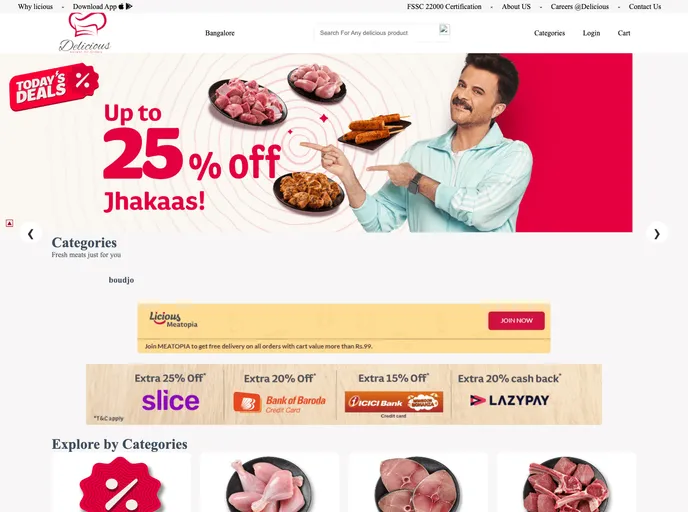
Overview:
The Licious Clone is a collaborative project that aims to provide users with a website clone of Licious, a popular online marketplace. With this clone, users will be able to easily purchase a wide range of products, while admins will have full control and regulation over the front-end of the website.
Features:
- User-friendly Interface: The Licious Clone provides a user-friendly interface, making it easy for users to navigate the website, browse products, and make purchases.
- Product Selection: Users can choose from a wide range of products available on the Licious Clone, including meat, seafood, and other delicacies.
- Admin Control: Admins have complete control over the front-end of the website, allowing them to regulate and manage product listings, user information, and other site functionalities.
Installation:
To install and run the Licious Clone, follow these steps:
- Clone the repository to your local machine:
git clone https://github.com/your-username/licious-clone.git
- Install the required dependencies:
cd licious-clone
npm install
- Set up the database by running the provided SQL script:
mysql -u username -p database_name < database_script.sql
- Configure the database connection in the
config.jsfile:
module.exports = {
  database: 'your_database_name',
  username: 'your_username',
  password: 'your_password',
  host: 'your_host',
  dialect: 'your_dialect'
};
- Start the application:
npm start
- Open a browser and navigate to
http://localhost:3000to access the Licious Clone website.
Summary:
The Licious Clone is a collaborative project that offers users a fully functional clone of the Licious website. With its user-friendly interface and wide range of products, users can easily browse and purchase items of their choice. Additionally, admins have complete control over the front-end, enabling them to manage and regulate various aspects of the website.






































