



 Github Stars:
 Last Commit:
  Created:
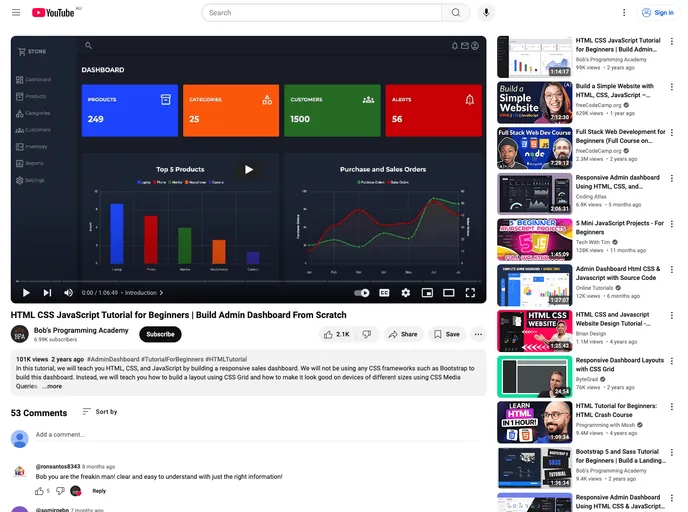
Overview:
The Responsive Sales Dashboard is a web-based application built using HTML 5, CSS 3, and JavaScript. It provides users with a visually appealing dashboard that displays sales data in the form of interactive charts. The application is designed to be responsive, ensuring optimal user experience across various devices and screen sizes.
Features:
- Responsive Design: The dashboard is built with a responsive design, allowing it to adapt and display properly on different screen sizes and devices.
- Interactive Charts: The application utilizes ApexCharts to create visually appealing and interactive charts that display sales data in a clear and understandable manner.
- Real-time Data Updates: The dashboard has the capability to fetch and update sales data in real-time, providing users with the most up-to-date information.
- Easy Installation: The application can be easily installed and set up on your local machine using Visual Studio Code and the Live Server extension.
Installation:
To install and run the Responsive Sales Dashboard, follow these steps:
- Install Visual Studio Code with the Live Server extension.
- Launch Visual Studio Code and open the project folder.
- Start the Live Server by clicking on “Go Live” in the bottom right corner of the status bar.
- The application will automatically open in your default web browser.
- To view the dashboard, go to http://127.0.0.1:5500/index.html in your web browser.
Summary:
The Responsive Sales Dashboard is a powerful tool for businesses to visualize and analyze sales data. With its responsive design and interactive charts, users can easily track and monitor sales performance across different devices. The easy installation process using Visual Studio Code and the Live Server extension makes it convenient for users to set up the application on their local machines.







































