



 Github Stars:
 Last Commit:
  Created:
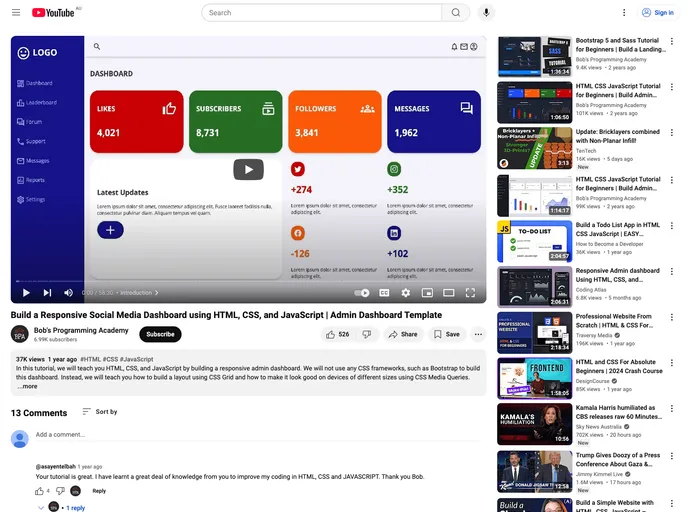
Overview
The Responsive Social Media Dashboard is a web application designed to provide users with a seamless and user-friendly experience in managing and monitoring their social media accounts. Built using HTML5, CSS3, and JavaScript, this dashboard offers a responsive design that adapts to various screen sizes, allowing users to access and navigate the application on different devices.
Features
- Responsive Design: The dashboard is built with a responsive design, ensuring optimal user experience and functionality across different devices, including desktops, tablets, and mobile phones.
- Social Media Integration: Users can easily connect and manage multiple social media accounts within the dashboard. They can view and schedule posts, track engagement metrics, and respond to comments and messages directly from the application.
- Real-time Analytics: The dashboard provides real-time analytics, allowing users to monitor the performance of their social media accounts. They can access key metrics such as follower growth, post engagement, and reach to make data-driven decisions for their social media strategies.
- Customizable Interface: Users have the ability to customize the interface of the dashboard according to their preferences. They can choose from a variety of themes, layouts, and color schemes to personalize the look and feel of the application.
- Task Management: The dashboard includes a task management feature that enables users to create, assign, and track tasks related to their social media campaigns. They can set deadlines, add subtasks, and receive notifications to stay organized and efficient.
- Collaboration: Users can collaborate with team members by assigning roles and permissions within the dashboard. This allows for seamless coordination and teamwork in managing social media accounts.
Installation
To install the Responsive Social Media Dashboard, follow these steps:
- Download the project files from the official website of Bob’s Programming Academy.
- Extract the downloaded zip file to a desired location on your computer.
- Open the extracted folder and locate the “index.html” file.
- Double-click on the “index.html” file to open it in a web browser.
- The dashboard should now be accessible and ready to use.
Summary
The Responsive Social Media Dashboard is a feature-rich web application that provides users with an efficient and intuitive platform to manage their social media accounts. With its responsive design, real-time analytics, and customizable interface, it offers a comprehensive solution for individuals and businesses alike. Additionally, the inclusion of task management and collaboration features further enhances its usability and effectiveness. Overall, this dashboard serves as a valuable tool for optimizing social media strategies and maximizing online presence.







































