



 Github Stars:
 Last Commit:
  Created: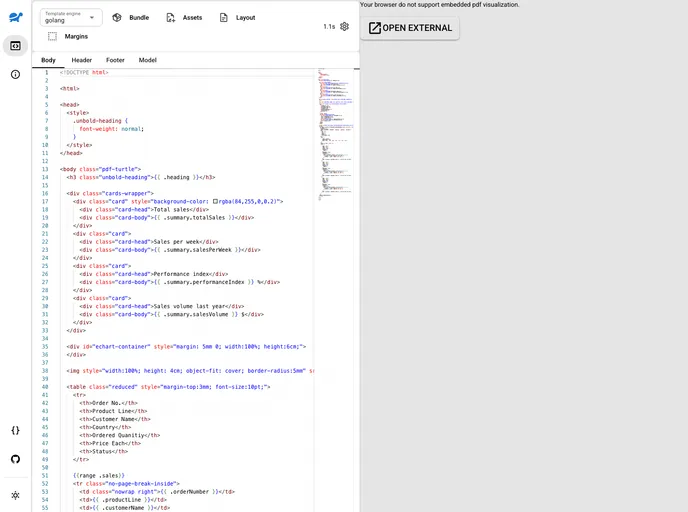
Overview
PdfTurtle is an HTML to PDF generation service that allows users to generate PDF reports and documents from HTML templates or raw HTML. It is a free, open-source, and self-hosted service that supports modern HTML and CSS standards using the latest Chromium engine. PdfTurtle offers features such as built-in template engines, bundle template and assets in a ZIP file, fast generation with limited resources, and support for multiple replicas. It also provides a frontend playground for rapid development and includes beautiful fonts and preoptimized styles for PDF or print.
Features
- Free, OpenSource and Self-Hosted: PdfTurtle is a free and open-source service that can be self-hosted.
- Generate PDFs in a descriptive way from HTML and CSS (with JavaScript support): PdfTurtle allows users to generate PDFs by providing HTML templates or raw HTML along with CSS styles, with support for JavaScript.
- Supports modern HTML and CSS standards (uses latest Chromium engine): PdfTurtle supports the latest HTML and CSS standards by utilizing the latest Chromium engine.
- Builtin template engines (go-template, raymond and django): PdfTurtle comes with built-in template engines such as go-template, raymond, and django.
- Bundle template and assets in ZIP file (see Bundle workflow): Users can bundle their templates and assets in a ZIP file for easy management and deployment.
- Fast generation with limited resources (limited multithreading): PdfTurtle offers fast PDF generation even with limited resources through limited multithreading.
- Multiple replicas supported (stateless service design): The service is designed to support multiple replicas, ensuring scalability and fault tolerance.
- Frontend (Playground) for rapid development: PdfTurtle provides a frontend playground for rapid development, allowing users to test and design their PDFs.
- Beautiful fonts included and preoptimized style (CSS) for PDF or print: PdfTurtle includes beautiful fonts and preoptimized styles for creating visually appealing PDFs for printing or digital use.
- Container image available (see Run with docker): PdfTurtle provides a container image that can be easily deployed using Docker.
Installation
To run the PdfTurtle service, it is recommended to use the Docker container. The container image is available on Docker Hub and can be pulled using the following command:
docker pull pdfturtle/pdfturtle
You can also use the tag *-playground to get a bundled image with the web playground.
PdfTurtle requires certain configuration options, which can be provided either as command line arguments or environment variables. Here are the available configuration options:
--help: Show help--logDebugorLOG_LEVEL_DEBUG: Enable debug log level--logJsonOutputorLOG_JSON_OUTPUT: Output logs in JSON format--renderTimeoutorRENDER_TIMEOUT: Timeout for rendering in seconds--workerInstancesorWORKER_INSTANCES: Number of worker instances--portorPORT: Server port--maxBodySizeorMAX_BODY_SIZE: Maximum body size in megabytes--servePlaygroundorSERVE_PLAYGROUND: Serve playground from a specific path--secretorSECRET: Secret used as bearer token
Summary
PdfTurtle is a versatile HTML to PDF generation service that offers features such as support for modern HTML and CSS standards, built-in template engines, bundle workflow, and rapid development with the provided Playground. With PdfTurtle, users can easily generate PDF reports and documents from HTML templates or raw HTML in a descriptive way. By self-hosting the service using the Docker container image, users can take advantage of the fast generation capabilities and scalability provided by PdfTurtle.








































